General
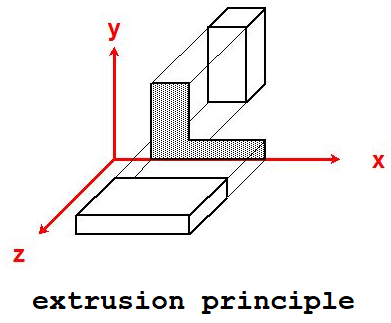
Since version 6.0, it has become possible to extend planar and axial geometries using 3D geometry obtained by extrusion . This, while maintaining the same interface and the same execution speed.
Available analysis
- Electrostatics
- DC Conduction
- Steady heat
Concept
You create the geometry as before, in a 2D plane, define the materials and boundary conditions.
 The properties of geometric entities can be assigned before or after extrusion.
The additional step is the definition of "z" dimensions, to define the different volumes in space.
The selection of geometric entities is very easy in the 3D interface.
A context menu allowing you to make the different parts of the design visible or invisible.
The properties of geometric entities can be assigned before or after extrusion.
The additional step is the definition of "z" dimensions, to define the different volumes in space.
The selection of geometric entities is very easy in the 3D interface.
A context menu allowing you to make the different parts of the design visible or invisible.

 using new functions symbolized by the icons shown here. Other functions : 2D/3D switching, selection,
fast view display, a context menu to hide or view subsets.
using new functions symbolized by the icons shown here. Other functions : 2D/3D switching, selection,
fast view display, a context menu to hide or view subsets.